5-Minute Domain SEO Audit With Batch Browser Tabs
Audit indexing, authority, traffic mix, Core Web Vitals, and archive history in 6 tabs from one URL input, plus when to run the 7-tab technical check.
Why a 6-tab batch audit beats manual tab hopping
Opening six diagnostic tools from one domain input cuts first-pass triage from minutes of repetitive typing down to a single click, while keeping your tabs in a predictable left-to-right reading order.
When evaluating a competitor domain, an acquisition target, or a new client site, the initial check almost always answers the same questions: is the site indexed properly, how strong is its backlink profile, where does its traffic come from, do real users hit Core Web Vitals targets, and has the domain changed hands before? Repeating that routine across ten domains manually means opening sixty tabs by hand.
Inside the URL Audit tab on the SERP Tabs launcher, selecting the default Audit (6) preset expands one pasted domain or full URL locally in your browser without sending your query to a backend server.
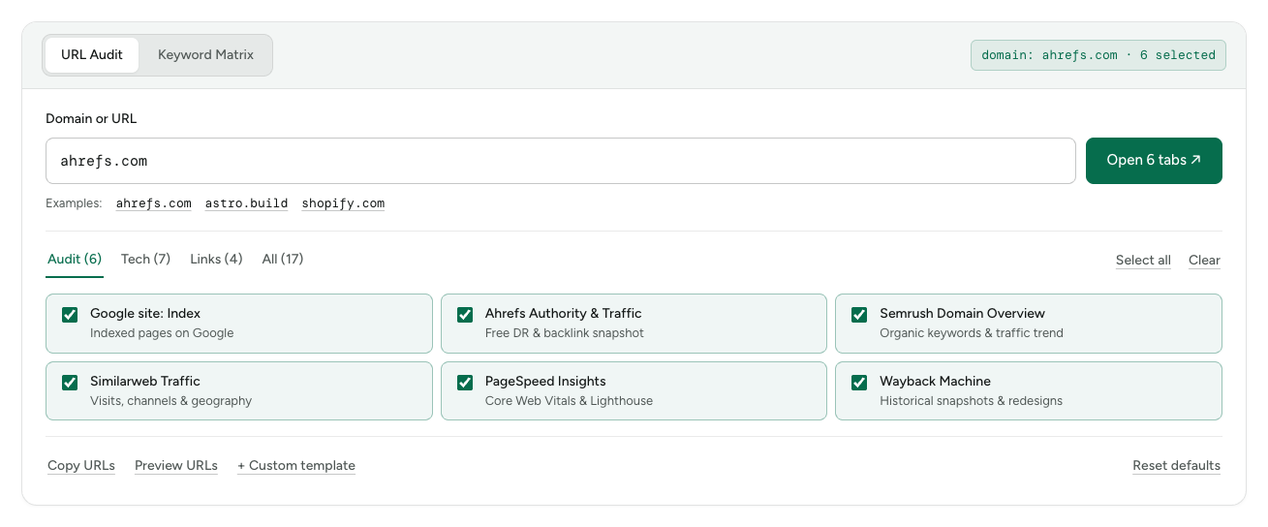
What the 6 default Audit tabs check
Each tab in the Audit (6) preset isolates a different diagnostic signal. As of November 2026, all six destinations accept direct URL parameters, though third-party platforms apply their own free-tier quotas or login gates.
| Tab order | Destination | Primary signal | Scope & known limits |
|---|---|---|---|
| 1 | Google site: Index |
Indexed sections, staging leaks, URL parameters | Sampled estimate per Google Search Essentials; not a complete Search Console count. |
| 2 | Ahrefs Authority & Traffic | Free Domain Rating (DR) and referring-domain snapshot | High-level summary only; deep link exports require an Ahrefs account. |
| 3 | Semrush Domain Overview | Organic keyword trend and paid/organic split | Daily free lookup cap applies without a signed-in Semrush plan. |
| 4 | Similarweb Traffic | Estimated visits, channel mix, and top geographies | Modelled estimates; low-traffic sites often return insufficient data. |
| 5 | PageSpeed Insights | Real-user CrUX Core Web Vitals plus Lighthouse lab diagnostics | Evaluates the exact URL entered; targets per web.dev are LCP ≤ 2.5 s, INP ≤ 200 ms, CLS ≤ 0.1. |
| 6 | Wayback Machine | Historical snapshots, redesigns, and expired-domain pivots | Coverage depends on Internet Archive crawl history and robots.txt history. |
Read the six tabs left to right: verify index hygiene first, cross-check authority against traffic channel mix, confirm Core Web Vitals on the exact landing page, and use Wayback Machine to catch domain repurposing or past migrations.
When to switch to the Tech (7) or Links (4) presets
If the initial 6-tab pass reveals missing pages, sudden organic drops, or markup warnings, switch the preset tab inside URL Audit rather than opening extra tools manually:
- Tech (7) — Launches Google Rich Results Test (to validate supported structured data such as
Article,Product, andBreadcrumbListper Google’s structured data gallery), plus direct requests torobots.txt,sitemap.xml,llms.txt, BuiltWith, SecurityHeaders, and WHOIS & DNS. Checkingrobots.txtandsitemap.xmldirectly often catches an accidentalDisallow: /rule before you spin up a full crawler. - Links (4) — Opens Ahrefs Backlink Checker, Moz Domain Analysis, Majestic Site Explorer, and a Google off-site brand mention query (
"domain" -site:domain) when you need deeper backlink verification.
Need specialized crawlers or log analyzers beyond quick tab checks? Browse all 125 tools in the SEO Tools Directory, or review our pop-up permission setup guide if your browser blocks tabs 2 through 6 on the first launch.
Sources & further reading
Something to correct? Contact SERP Tabs.