Allow Browser Pop-Ups Safely for Batch SEO Tabs
Why browsers block extra tabs on the first click, how to allow pop-ups for one trusted site only, and how SERP Tabs recovers blocked links safely.
Why browsers allow only the first tab by default
Modern browsers allow one window.open() tab per user click and block additional calls from the same click handler unless you explicitly allow pop-ups for that origin. This is expected browser security behavior documented in MDN Web Docs for Window.open().
When you click Open 6 tabs ↗ on the SERP Tabs launcher for the first time, Chrome, Edge, Safari, and Firefox typically open the first destination tab and silently block tabs 2 through 6 to stop malicious ad scripts from flooding your screen.
You should never disable pop-up blocking globally across all websites. Instead, grant a single origin-level exception only for trusted batch utilities you trigger yourself.
Allowing pop-ups for one site only
Per Google Chrome Help and current desktop browser settings (verified November 2026), enable site-level pop-ups in three seconds:
| Browser | Where to allow pop-ups for serptabs.com only |
|---|---|
| Chrome / Edge / Brave | After clicking Open 6 tabs ↗ once, click the blocked-window icon at the right edge of the address bar, select Always allow pop-ups and redirects from this site, and click Done. |
| Safari (macOS) | Open Safari → Settings → Websites → Pop-up Windows, locate serptabs.com, and switch its permission to Allow. |
| Firefox | Click the pop-up notification bar or address-bar permission icon after the first batch click and choose Allow pop-ups for this site. |
On iOS Safari, Chrome for Android, or locked-down enterprise browsers where multi-tab pop-ups cannot be enabled persistently, rely on the built-in recovery fallback below rather than weakening device security.
Built-in recovery when tabs stay blocked
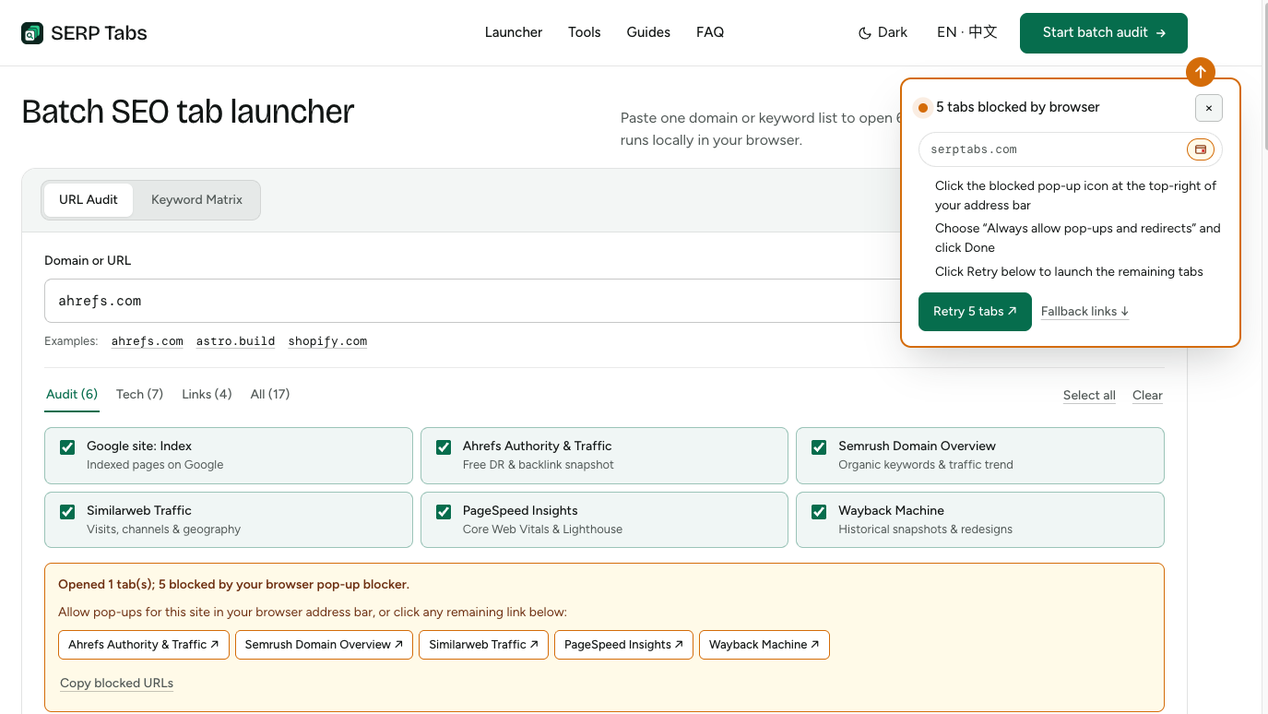
Every time a browser blocks one or more window.open() calls, SERP Tabs detects the null return value immediately and shows two recovery aids without losing your expanded URLs:
- Top-right pop-up coachmark — Points toward the browser’s address-bar icon with step-by-step instructions and a Retry tabs ↗ button once you grant permission.
- Inline fallback banner — Lists every unlaunched destination as an ordinary clickable link (
noopener noreferrer) alongside a Copy blocked URLs button for quick pasting.
Once pop-ups are allowed for this origin, try running the 5-minute domain SEO audit or a focused 12-tab batch in the Keyword Matrix workflow.
Sources & further reading
Something to correct? Contact SERP Tabs.